
Manage national references in adoptions
In this article:
Normative references in national adoption
Bibliographic references in national adoption
This article is relevant for:
- Participants of the ISOlutions OSD pilot using OSD national platform to author their national adoptions
Normative references in national adoption
National adoptions can contain both international normative references associated with the source standard and national normative references added by the NSB adopting the standard.
By default, the following clauses will be available in the adoption structure for normative references in the standard layer:
- Clause 2: Normative references: By default contains the text of clause 2 from the international standard being adopted. Textual content here can be modified.
-
Clause 2.1: International Normative References: By default is empty. Textual content can be added here.
The Normative references under clause 2.1 international Normative References section by default contains the normative reference list inherited from the standard being adopted. Any international normative references added in the adoption content will also be listed here.
-
Clause 2.2: National Normative References: By default is empty. Textual content can be added here.
The Normative references under clause 2.2 National Normative References is empty by default. If national normative references are added in the adoption content, they will be automatically listed here.

Please note:
If no national normative references are added, and no text has been included in Clause 2.1, the rendered HTML preview, DOCx and PDF will ignore clause 2.2 and contain only Clause 2 with the international references directly under it.
Add a normative reference
- Place the cursor in an editable location in the adoption.
- From the Reference menu, select Link to reference.
- For Insert as, select Normative reference.
- For Insert in, select National section or International section.
- Find or enter the reference details.
- Click on the Insert button.

Please note:
- References inserted in the National section are maintained in the National normative references list.
- References inserted in the International section are maintained in the international Normative references list.
Bibliographic references in national adoption
National adoptions can contain both international bibliographic references associated with the source standard and national bibliographic references added by the NSB adopting the standard.
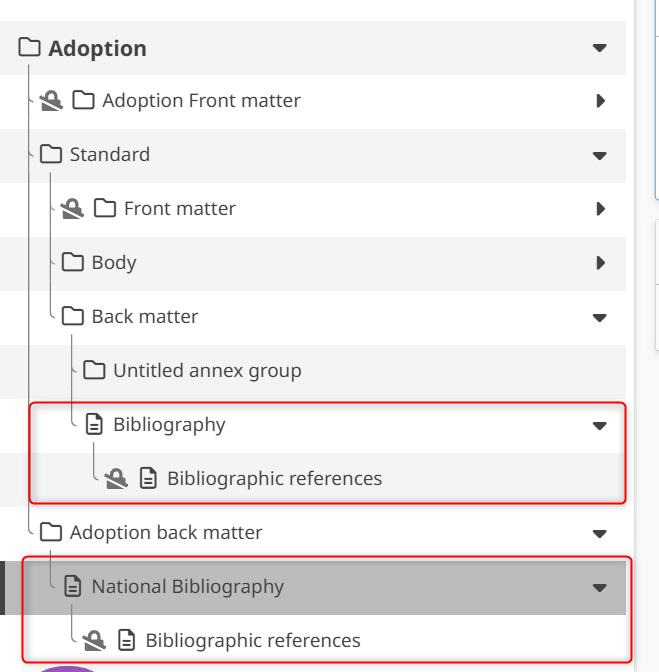
By default, the following clauses will be available in the adoption structure for bibliographic references:
- Standard layer: Standard back matter contains:
- Bibliography: By default this section empty. Textual content can be added here.
- Bibliographic references under it: By default contains the international bibliographic reference list inherited from the international standard being adopted
- Adoption layer: National back matter contains
- National Bibliography section: By default this section is empty. Textual content can be added here.
-
Bibliographic references under it: By default this section is empty. National bibliographic references added in the the adoption content will be listed here.
Add a bibliographic reference
- Place the cursor in an editable location.
- From the Reference menu, select Link to reference.
- For Insert as, select Bibliographic reference.
- For Insert in, select National section or International section.
- Find or enter the reference details.
- Click Insert.

Please note:
- References inserted in the National section will be listed in the Bibliographic references under the National Bibliography section.
- References inserted in the International section will be listed in the Bibliographic references under the international Bibliography section.
IMPORTANT!
National bibliography numbering: National bibliographic references continue the numbering sequence after the last reference number used in the international bibliography.