
Deleting Inactivated User Accounts in the Global Directory
In this article:
This article is relevant for:
- User administrators
Summary
Inactivated user accounts in the Global Directory should be deleted once they are no longer required. This supports:
- Accurate and up-to-date user records
- Elimination of unnecessarily retained data
- Continued compliance with applicable data protection regulations
Warning
Deletions in the Global Directory cannot be undone — always double-check before confirming deletion.
What deleting inactive user accounts means
- Deletion ensures that a user account is fully removed from the Global Directory and can no longer be viewed or used by any National Standards Body (NSB).
- Deletion affects only the Global Directory. For example, historical data linked to the account in other systems (e.g., Documents, Ballots, Meetings, Projects) will be retained per record-keeping requirements.
- Contrary to deletion, inactive accounts remain visible and can be re-activated.
How to delete inactive accounts
-
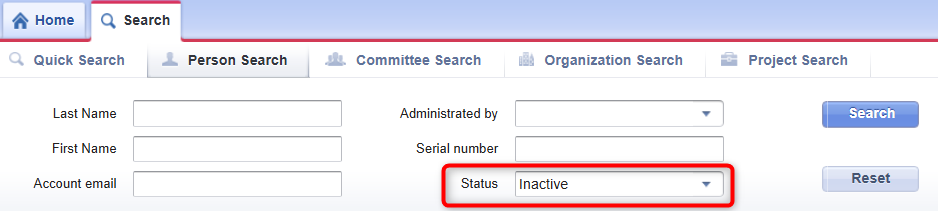
View inactive accounts, in the Global Directory: person search > status = inactive
-
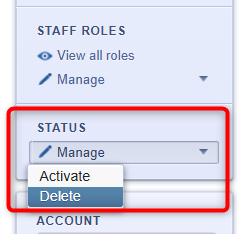
Select the deletion option from the lower-left corner: status > manage > delete
Please note
- Deleted accounts cannot be restored.
- If an account is deleted in error, it must be recreated and will be assigned a new Global Directory ’serial number’.
Additional Guidance
- A full list of your organization’s inactive accounts can be accessed
- via the SD Member Dashboard by the main contact user administrator under Inactive Accounts in Global Directory Data Overview, or
- by using the Person search option, in the Global Directory , and filtering by the status ‘Inactive’ to display all accounts administered by CEN that have been inactivated.
- For bulk deletions or technical assistance, contact the ISO Helpdesk at helpdesk@iso.org.
For any questions or clarification, please contact the ISO Helpdesk at helpdesk@iso.org.
Best Practices & Reminders
- Review accounts periodically to ensure you only keep relevant and necessary user data.
- Respect applicable data protection regulations by removing outdated or unnecessary accounts.
- Start with the current Inactive in the SD Member Dashboard (accessible only to user administrator main contacts).