
National OSD roles and adoption feature permissions
This article is relevant to:
NSB user administrators managing permissions for OSD national via OSD Tools
Overview
NSB administrators can use the OSD Tools permission matrix to manage which features and functions are available to users based on their OSD roles. Permissions can be enabled or disabled to match the NSB’s working practices.
For National OSD, user access is determined by the roles assigned in the Global Directory together with the permissions configured in OSD Tools.
National OSD introduces:
- Two new roles: National Editorial Team and National Publication Team
- A new permission: Mark content in adoption.
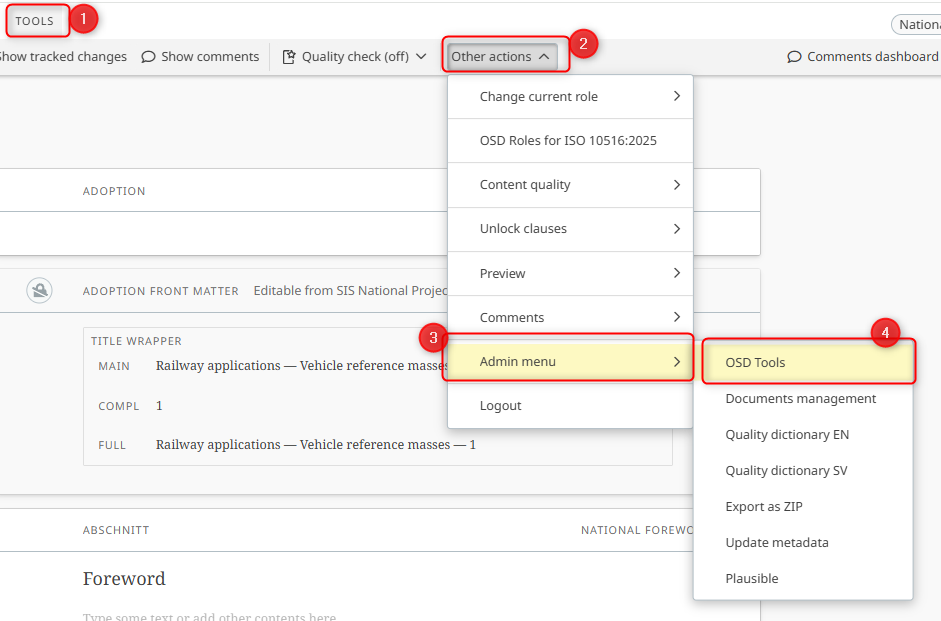
To configure OSD permissions, access OSD Tools:
- Open an OSD document.
- From the Tools menu, select Other actions.
-
From the Admin menu, select OSD Tools.
Please note:
Please watch this video guide for more information on how to: Manage NSB OSD Permissions
Permissions for roles: National Editorial Team and National Publication Team
The following roles can be assigned to users in Global Directory:
- National Editorial Team: For users supporting editorial work, language review and other authoring activities.
- National Publication Team: For users supporting publication activities.
To configure OSD permissions for the above roles (to define how users assigned these roles In GD can access the various features for your NSB's National OSD documents):
- Open OSD Tools.
- Enable or disable the relevant permissions under the Editorial Team and Publication Team columns

Please note:
- Users must be assigned the relevant role in Global Directory to receive its configured permissions across the NSB's National OSD documents. See How to assign national role in Global Directory
- Assigning an Editor team member or Publication team member to an individual project in NPP identifies the responsible contact. It does not determine OSD access. See Role information in national projects.
Permission for feature: Mark content in adoption
The Mark content in adoption permission allows users to mark or unmark applicable content as a national change in National OSD adoptions.
This permission is specific to national adoptions and does not apply in the same way to Homegrown, ISO or CEN standards.
To configure this permission:
- Open OSD Tools.
- Under Other, find Mark content in adoption.
- Enable or disable the permission for each applicable OSD role.
