
Author national adoptions in OSD
In this article:
This article is relevant to:
- Participants of the ISOlutions OSD pilot using OSD national platform to author their national adoptions
National adoptions in OSD combine the content of the standard being adopted with national content maintained by the NSB. The adoption structure keeps national and international content distinguishable during authoring.
Authoring mode
OSD determines the authoring mode from the project information in the National Project Portal. An Adoption project opens in National Adoption mode, while a Homegrown project opens in National Homegrown mode.
Once an online document has been created, its fundamental authoring mode cannot be changed from Homegrown to Adoption or from Adoption to Homegrown.
Understand the adoption structure
A national adoption contains three main areas:
- National front matter
- The standard layer containing the content of the standard being adopted
- National back matter

National front matter
The national front matter can contain national content such as:
- National Title
- National Foreword
- National Introduction and its subclauses
This content is separate from the Foreword and Introduction belonging to the source standard.

Vienna Agreement content
For supported Vienna Agreement projects, applicable CEN front matter can be retrieved and included together with the international source content.

National back matter
The national back matter can contain:
- National annexes
- National annex subclauses
- National bibliography content

Add and remove optional content
Optional national and international clauses can be added or removed where the document model permits. When a parent clause is removed, its contained subclauses or other dependent content are removed where applicable.
See: Manage clauses for information on how to do this in OSD
Reorder content
Applicable national subclauses and numbered paragraphs can be reordered from the document outline. Where numbering applies, OSD updates the numbering automatically after supported content is reordered or removed.
See: Reorder clauses for information on how to do this in OSD
Language behavior
For a national adoption that is not a translation:
- National-layer content uses the National standard language defined in the National Project Portal.
-
Standard-layer content uses the original language of the standard being adopted.
Example, for this project, which is an identical adoption of an ISO standard, with National standard language: Swedish, and Translation: No
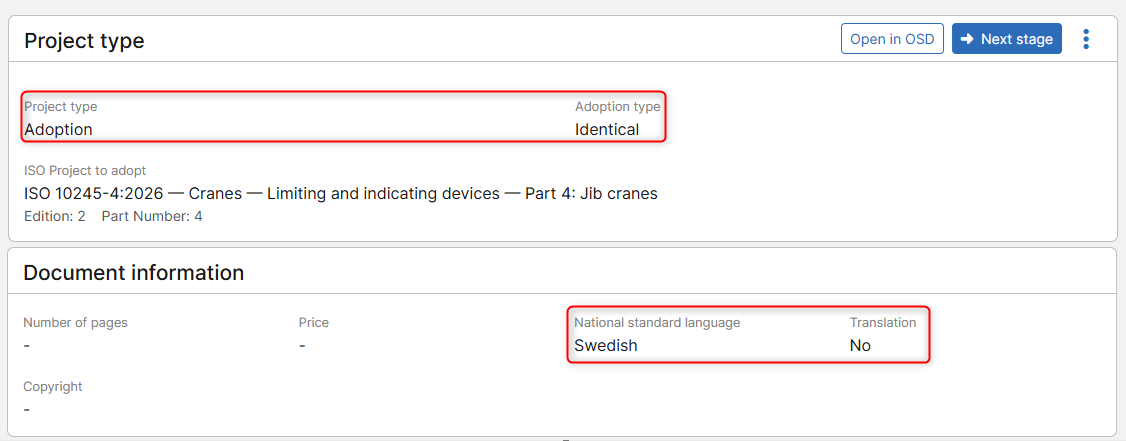
The sections within the adoption layer (such as National Foreword, and National Introduction), the language of the online document is set to Swedish:

Whereas, the language of the sections within the standard layer (the content of the ISO standard being adopted), is set to the original language (English in this case):

For an adoption marked as a translation:
- The National standard language is used as the National standard language for both national and standard-layer content.
Example, for this project, which is an identical adoption of an ISO standard, with National standard language: Swedish, and Translation: Yes

The language for the whole online document (Adoption layer and Standard layer) is set to the National standard language: Swedish


Modify the language of a specific clause or element
Please note that the inherited language for individual supported elements throughout the document can be overridden where required.
To modify the language of a clause or an element:
- Select the clause or element
- Click on the Language field at the bottom
- Select whether the language should be applied to the full clause or an element within it
- Set the new language
- Click on the Apply button

Please note:
Please see the section: National standard language and translation in the article: Create national project with online document for more information on how to maintain this information for a national project.